

Linux runs most of the internet cloud infrastructure, enterprise servers, networking gear, industrial controllers, embedded platforms. Its reputation for stability and security is well earned. But that reputation has a catch: Linux is secure by design, not secure by default. In engineering projects, we have observed the same security challenges recurring across different Linux deployments. Whether it’s a production server, a development workstation, or an embedded
Linux platform, the underlying issues are remarkably similar: excessive privileges, exposed services, weak authentication, and inconsistent patch management. This article introduces the essential Linux security concepts and best practices every engineer should know to build and maintain secure Linux systems.

Understanding the Linux Security Architecture
Linux follows a layered security architecture. Every operation that accesses hardware or protected resources passes through the Linux kernel, which enforces security policies and isolates
applications.
The Linux kernel acts as the system’s primary security boundary by
- Managing user privileges
- Isolating processes
- Protecting memory
- Enforcing file permissions
- Controlling hardware access
- Applying security policies
The following figure illustrates the layered Linux security architecture and how the kernel acts as the central security layer between user applications and the underlying hardware.
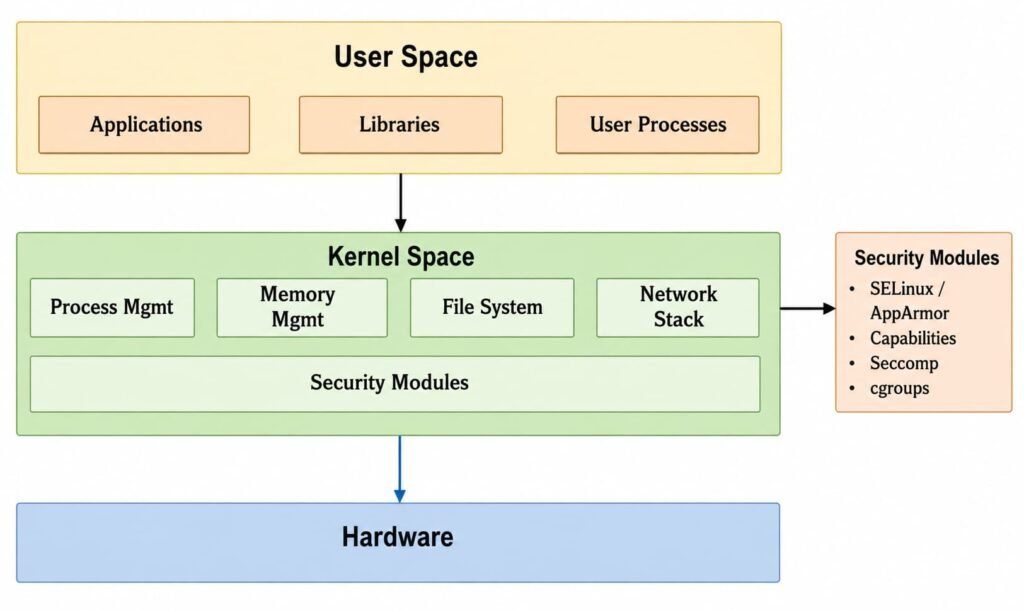
Figure 1. Linux Security Architecture
Even if an application is compromised, the kernel’s security mechanisms help prevent attackers
from gaining unrestricted control of the entire system.
User and Privilege Management
One of the most common security issues in Linux systems is excessive privilege assignment. Running applications as root, granting unrestricted sudo access, or leaving inactive administrator accounts increases the risk of privilege escalation.
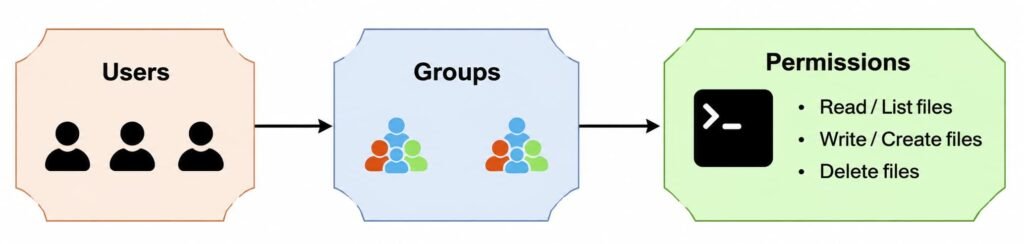
Figure 2. Linux User and Privilege Management
Best practices include:
- Run applications using dedicated service accounts.
- Follow the Principle of Least Privilege (PoLP).
- Limit sudo access to required commands.
- Audit SUID and SGID binaries regularly.
Create a dedicated service account
Applications and background services should run under dedicated system accounts instead of the root user. This limits the permissions available to the application and helps contain potential security breaches.
The following command creates a dedicated system account without a login shell or home directory:
useradd –system –no-create-home –shell /usr/sbin/nologin web_service
Audit SUID and SGID Binaries
SUID and SGID binaries execute with elevated privileges and are common targets during privilege escalation attacks. Regularly reviewing these files helps identify unnecessary or potentially risky executables.
Use the following command to list all SUID binaries on the system:
find / -perm -4000 -type f 2>/dev/null
Unexpected privileged executables should always be reviewed, as they may introduce privilege
escalation risks.
Understanding Your Attack Surface
Key Idea: You cannot secure what you don’t know is exposed.
Before implementing security controls, it is important to identify the components of your Linux system that are exposed to users or external networks. Running services, open ports, and network- facing applications collectively form the system’s attack surface. Reducing this attack surface helps minimize potential security risks.
Below Figure illustrates how external traffic reaches a Linux system through exposed network services and why identifying these entry points is an essential first step in securing the system.
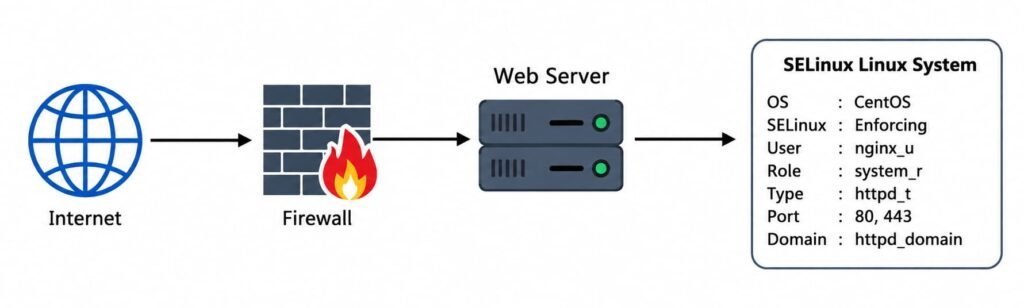
Figure 3. Linux System Attack Surface
Before changing configuration files or installing security tools, it’s important to understand what your system actually exposes.
A good starting point is identifying every listening service:
Lorem ipsum dolor sit amet, consectetur adipiscing elit. Ut elit tellus, luctus nec ullamcorper mattis, pulvinar dapibus leo.
ss -tulnp
This command lists all active network sockets along with the associated processes.
During security reviews, it is common to find:
- Debug services left running
- Development web servers exposed to the network
- Databases listening on all interfaces instead of localhost
- Legacy services no longer in use
Every unnecessary service increases the system’s attack surface. Similarly, minimizing installed software reduces risk. Every installed package introduces additional code that must be maintained and patched throughout the system’s lifecycle.
Common Linux Security Threats
Linux systems face a variety of security threats, ranging from unauthorized access to supply chain attacks. Understanding these attack vectors helps administrators prioritize security controls and reduce overall risk.
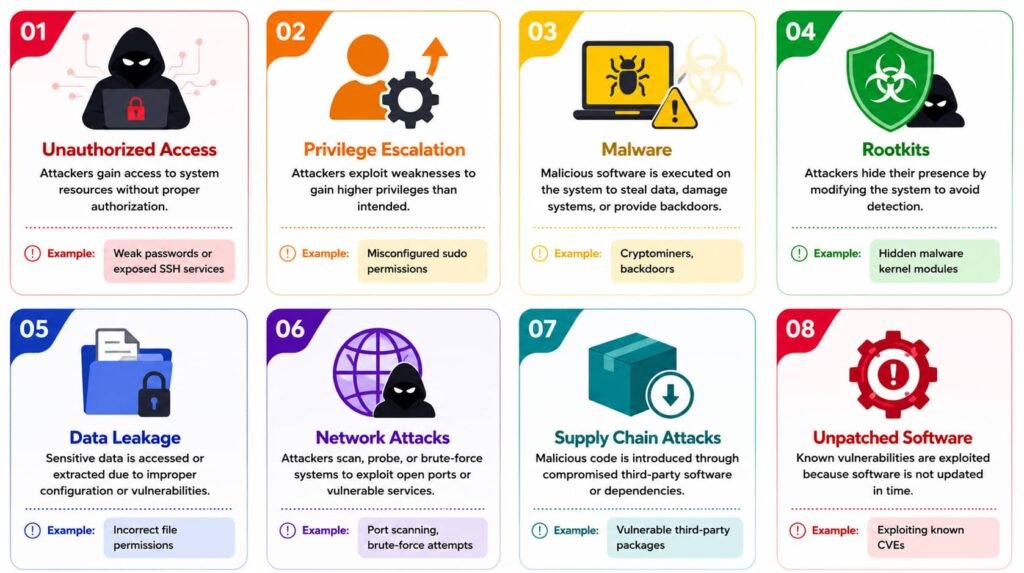
Figure 4. Common Linux Security Threats
Linux File System Security
Every file and directory in Linux is protected through an ownership and permission model. Each object has an Owner, Group, and Others, with separate permissions for Read (r), Write (w), and Execute (x).

Figure 5. Linux File Permission Model
Review sensitive permissions regularly:
ls -l
chmod
chown
When finer control is required, Access Control Lists (ACLs) provide additional flexibility.
Example:
ACLs enable controlled access without changing file ownership.
Proper permission management is one of the simplest and most effective ways to protect sensitive data.
Kernel Security Features
The Linux kernel provides multiple built-in security mechanisms that help defend against memory corruption, privilege escalation, and unauthorized access.
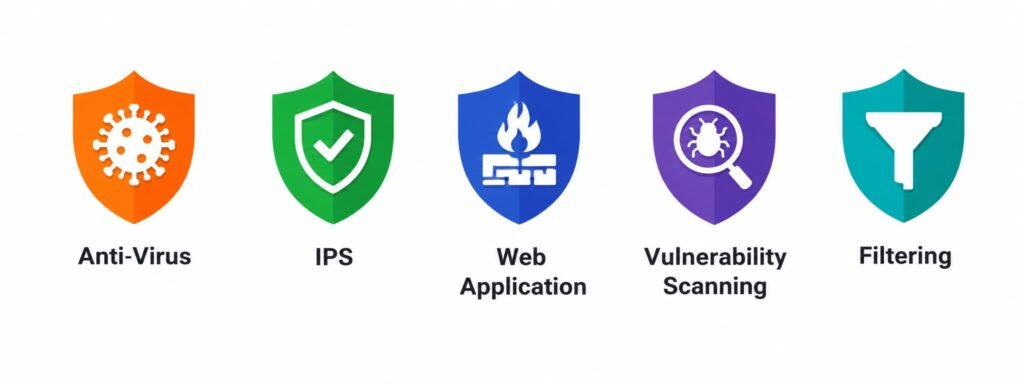
Figure 6. Linux Kernel Security Mechanisms
Important features include:
- Address Space Layout Randomization (ASLR)
- No-eXecute (NX)
- Stack Canaries
- Seccomp
- Kernel Module Signing
- AppArmor or SELinux
Verify ASLR is Active(2 mean fully enabled):
cat /proc/sys/kernel/randomize_va_spaceThese mandatory access control systems limit what a compromised process can do, even if it runs as root.
Tune important kernel parameters in /etc/sysctl.d/99-hardening.conf:
net.ipv4.conf.all.rp_filter = 1
net.ipv4.tcp_syncookies = 1
kernel.dmesg_restrict = 1
kernel.kptr_restrict = 2
Network Security
Use a strict firewall policy, allow only what is explicitly needed. Whether you use nftables (recommended) or iptables, the principle stays the same.
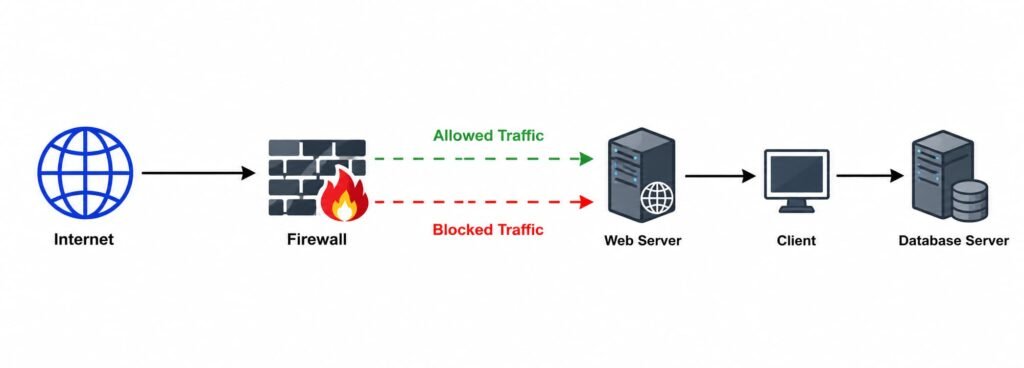
Figure 7. Linux Network Security and Firewall Protection
A simple default-deny policy:
nft add table inet filter
nft add chain inet filter input { type filter hook input priority 0 \; policy drop \; }
nft add rule inet filter input ct state established,related accept
nft add rule inet filter input iif lo accept
nft add rule inet filter input tcp dport 22 accept
A default-deny firewall policy ensures that only explicitly permitted traffic can reach the system.
Beyond the firewall itself:
- Disable services you’re not using
- Use SSH keys, not passwords
- Disable root SSH login outright
- Add Fail2Ban for brute-force protection
Logging, Monitoring & Patching
Security requires continuous monitoring and regular updates.
Useful tools include:
- journalctl
- auditd
- rsyslog
Example audit rule:
auditctl -w /etc/passwd -p wa
Keep systems updated to reduce exposure to known vulnerabilities.
For Debian/Ubuntu:
sudo apt update && sudo apt upgrade -y
Security monitoring and timely patching remain two of the most effective defenses against evolving threats.
Where to Actually Start?
Securing a Linux system does not have to be overwhelming. Rather than implementing every security measure at once, beginning with the most impactful improvements. The following checklist provides a practical starting point for strengthening your system’s security.
1. Audit listening ports and running services
- Remove or disable unnecessary services.
- Close unused network ports.
2. Review privilege escalation paths
- Audit SUID and SGID binaries.
- Restrict sudo permissions to only what is required.
- Avoid running applications as the root user.
3. Enable Mandatory Access Control
- Configure AppArmor or SELinux in enforcing mode.
- Avoid disabling security policies unless absolutely necessary.
4. Implement a secure firewall policy
- Configure a default-deny firewall.
- Explicitly allow only required network traffic.
5. Enable monitoring and automate updates
- Centralize system logs where possible.
- Monitor security events regularly.
- Apply security patches promptly or automate security updates.
Building a secure Linux system is an ongoing process rather than a one-time task. By implementing these foundational practices first, organizations can significantly reduce security risks and establish a strong baseline for future hardening efforts.
Conclusion
Linux provides a strong security foundation, but maintaining a secure system requires continuous effort. By following security best practices and regularly monitoring and updating systems, organizations can significantly reduce security risks and improve overall resilience.